A canvas that fits the task.
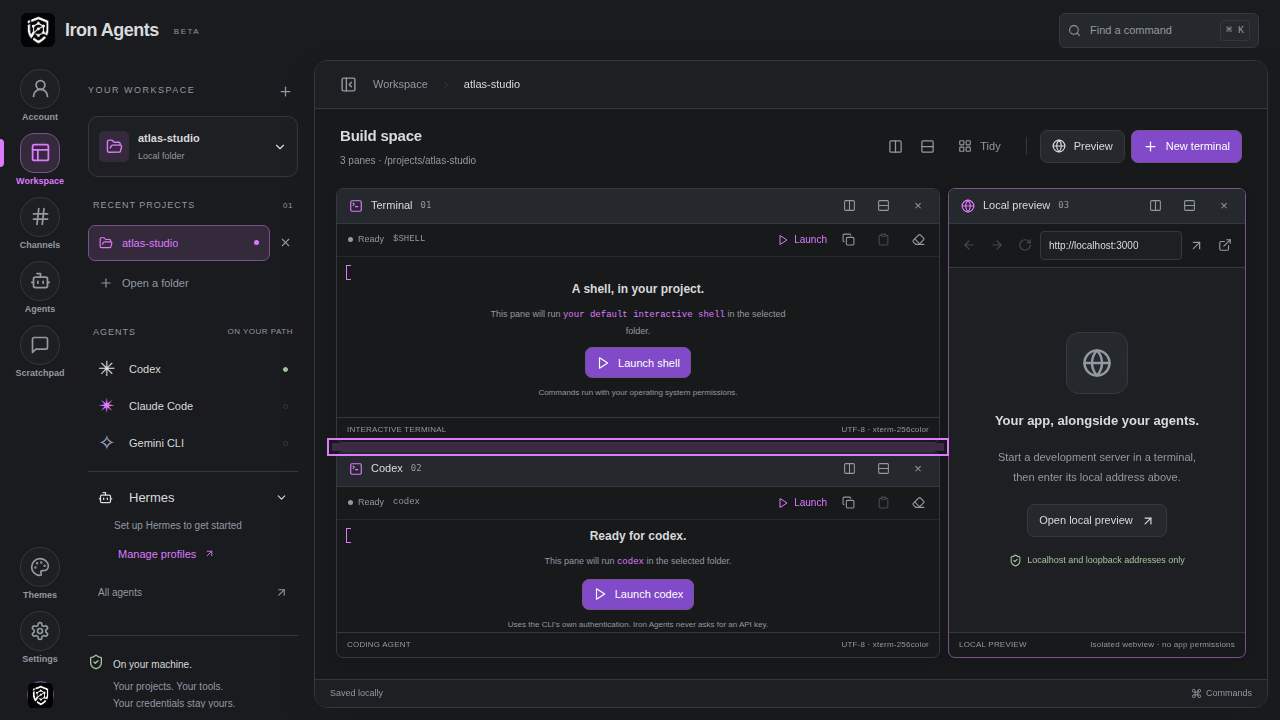
Split, resize, and arrange real terminals beside your local app preview. Your project layout is saved for the next session.
 Iron AgentsBETA
Client sign in
Iron AgentsBETA
Client sign in
YOUR DESKTOP. YOUR TOOLS.
Your coding agents, terminals, and local app.
Together in a workspace that runs on your machine.
BRING YOUR OWN TOOLS
BUILT AROUND THE WORK
Give each project a home. Keep the tools you need in view, and pick up where you left off.
Split, resize, and arrange real terminals beside your local app preview. Your project layout is saved for the next session.
Organize local conversations, pin useful messages, and follow assignments in threads. Your drafts and reading position stay with you.
Run Hermes tasks from a local channel. Follow progress, respond to permission requests, and review the reply in the same thread.
LOCAL BY DESIGN
Iron Agents brings your existing setup together. Choose your project, connect your installed tools, and decide what runs.
Your workspace and local agents run on your computer. There’s no hosted execution layer to move your project into.
Bring your installed agents and their existing sign-ins. AI provider subscriptions and usage are separate from Iron Agents.
Manage your license, devices, and internal team from Account. Team membership requires an approved, verified company email domain.
THE NEXT STEP
Iron Agents is in beta. Customer installers are being prepared. Already have an account? Your client portal is ready.
Yes. Iron Agents works with locally installed Codex, Claude Code, Gemini CLI, and Hermes. You use your own provider accounts and plans.
Shared team channels are planned. Today, channels and conversations are local to your device. Account, device, and internal team administration are already connected.
Subscription pricing is still being finalized. AI provider usage will remain separate. There are no published plans or checkout available yet.
Not necessarily. The workspace runs on your computer, but your agents may send prompts and code to their AI providers according to your setup. Account and license checks also use the Iron Agents service.